Roll 20!
A dice roller on your wrist.
Ratings
Age
4+
Category
Board
Languages
English
Sun Oct 02 2022
What's new:
- Settings View
Swipe right on the main screen to show it
- Sound and haptics
Hear and feel the rolls!
- Shake to roll
Simiply shake your wrist to roll the dice! Note this is off by default and needs to be enabled in the settings view.
- WatchOS 8 and Apple Watch Ultra optimisations
- Spelling fix ;)

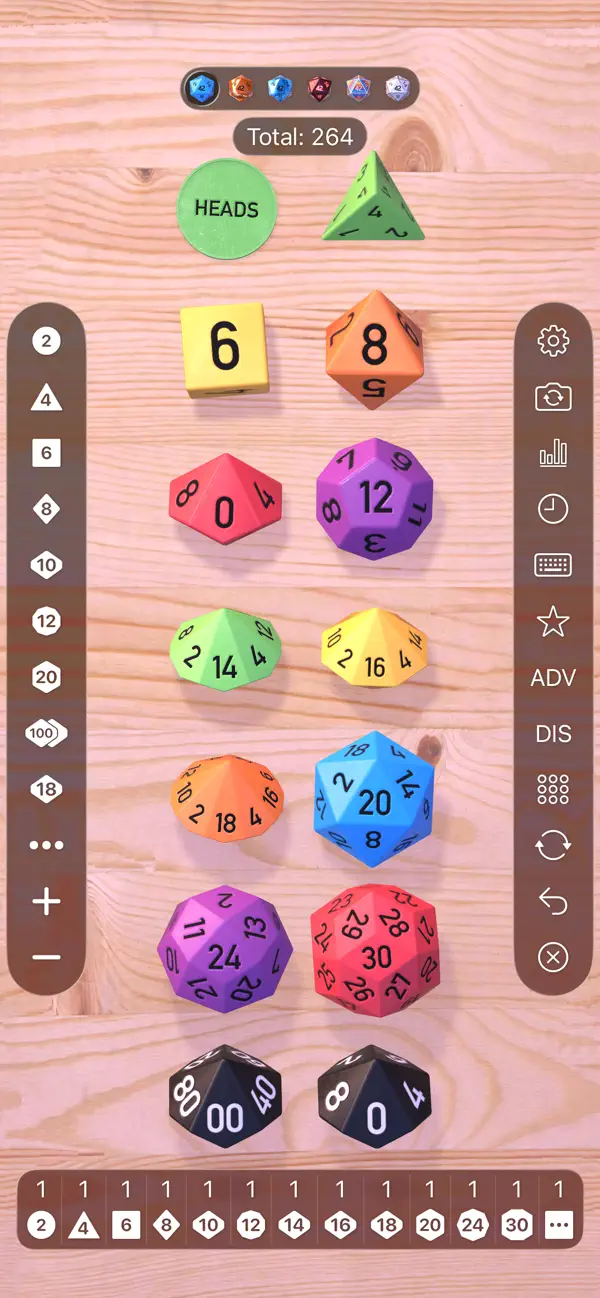
Roll 20 is a powerful and customizable digital dice set. Featuring a full range of polyhedral dice (d4, d6, d8, d10, d12, d20, and d%), it uses a realistic physics engine to ensure truly random results. Users can create custom dice sets, save frequently used rolls, and even add modifiers automatically. Whether you're a Dungeon Master or a player, Roll 20 provides a clean and efficient way to manage your tabletop gaming rolls.
Dinsun Expert Review
Our Expert Score
Roll 20 is a simple but effective digital dice roller that is clearly made by people who play tabletop RPGs. It’s not a 'game' in the traditional sense, but it’s an essential companion for any D&D or Pathfinder session. The 3D dice physics are surprisingly satisfying, giving that heavy 'clunk' sound when you roll a natural 20.
The app shines in its ability to handle complex macros. Instead of doing the math for your high-level Rogue's sneak attack, you can set up a single button that rolls the d20 and the 5d6 simultaneously. It’s clean, lightweight, and does exactly what it says on the tin. While it’s fairly basic, it’s one of the most reliable and user-friendly dice rollers on the App Store.
Features
Realistic 3D dice physics and sound
Full set of polyhedral dice included
Customizable dice colors and skins
Save and organize complex roll macros
Tips & Walkthrough
Go to the 'Settings' menu to save your character's main attack. You can input '1d20+8' and save it as 'Longsword.' This allows you to roll with your specific bonus with just a single tap during your turn.
Gameplays
You can shake your phone to rattle the dice in the virtual tray, or use a flicking motion on the screen to launch them. The harder you flick, the more the dice will bounce, just like on a real table.
Screenshot


Q&A
Yes, this is a standalone dice rolling tool and is not directly affiliated with the Roll20 virtual tabletop platform.
Ratings & Reviews
Buy this RIGHT NOW!
Wed Nov 22 2023 Maxoxo13I’ve used this app for 2 years, it’s so useful for when you need to solve a conflict, and the UI is made in a perfect way. If you purchase this app make and it’s not installed don’t worry, go to the App Store on your watch and search “roll 20” then click install and everything should work note: this is probably because you don’t have install automatically setting turned on, on the watch app. One thing that I personally would make the app better is to make a custom sided dice 🎲, thank you for making this app love it anyways I’m probably going back to spinning dice bye 👋.
Almost perfect
Sat Feb 10 2024 24395927395792I don't play dice games, but I like to randomize arbitrary decisions with my dice. I original plan was to get a set to have on the go, but this app completely replaces that need. The only wish I have above what this app offers is that it would include an alphabet roller as well, giving a random letter. Some people use this for Scattergories, but I use my 26-letter, 30-sided die to brainstorm ideas when I can't think of topics to get started with. With number and letter randomizer, this would be a complete and perfect app.
Good app, simple and effective, but…
Fri Sep 30 2022 DrMezmoWhile it is technically correct to use “die” or “dice” as the singular, the app uses “a dice” which is irksome to me even though it’s not incorrect. I don’t personally control the English language, but I want this to be incorrect, so an option to toggle the spelling would be a silly but appreciated addition, or maybe just omit “a” so it says “20-sided dice”
Wonderful app! Redownload from watch directly!
Mon Sep 16 2024 Aspen LiuI purchased this on my watch and loved it. I recently had to update my watch to a new phone and lost it- but the developer was so nice to give me instructions to just redownload it from my watch directly not my phone so I’m back in business! Highly recommend!!!
Love it!!
Sat Feb 01 2025 Fernie-3-I love the app!! I use it with my gf to try and make decisions since we are both very indecisive. I was just wondering if it’s ever planned to add a spinning animation instead of just the sound? I feel like it would be a great addition!
Can’t get it to work
Wed Jan 29 2020 Death_Jester_2Can not get the app to work or even show up on the watch. Edit: works fine. Thanks for the info on how to install properly.
Love it.
Sat Sep 23 2023 Squearl 3Best problem solver ever. Roll for what to eat. Roll for which child does what chore. special with someone else has the same app. It makes it way more fun.
Install it properly!
Thu Jan 23 2020 GarbubbySince this was my first watch-only app, it took some time to figure out how to initiate it on my watch. Once that was done, it works great.