Nonogram.com Color: Logic Game
Solve multicolor pixel puzzle!
Ratings
Age
13+
Category
Board
Languages
English
Tue Feb 17 2026
- Performance and stability have been improved.
We have carefully reviewed all your comments and have made the game even better. Please provide feedback as to why you love this game and what else you would like to see improved. Keep your mind active with Nonogram.com Color!

Nonogram.com is an addictive picture cross puzzle game that challenges your mind with logic and number-based riddles. Also known as Griddlers or Picross, the goal is to fill the grid based on numerical clues to reveal a hidden pixel art picture. Whether you are a beginner or a logic master, you can choose from various difficulty levels. Engage in Daily Challenges to earn trophies, participate in seasonal events to collect unique postcards, and use hints or auto-cross features to sharpen your skills.
Dinsun Expert Review
Our Expert Score
Nonogram.com is a masterclass in clean, logic-based puzzle design. For fans of Sudoku or Picross, this app is an essential download. The premise is simple: use numerical clues to reveal a hidden pixel art image. What makes this specific version stand out is the sheer volume of content; between the daily challenges, seasonal events, and tiered difficulty levels, you will never run out of puzzles to solve.
Technically, the app is very polished with a 'zen' aesthetic that makes long sessions very relaxing. However, as you move into the 'Expert' and 'Legendary' grids, the lack of a zoom feature on smaller phone screens can lead to frustrating accidental taps. Furthermore, the mistake system (which gives you three lives) can feel a bit punishing when an ad is triggered immediately upon losing. Despite these minor UI quibbles, it remains the most comprehensive and satisfying nonogram experience available on the App Store.
Features
Thousands of non-repeating pixel art puzzles
Daily Challenges with unique monthly trophies
Seasonal Events with collectible postcards
Hint and Auto-cross systems for assistance
Multiple difficulty levels from Easy to Expert
Tips & Walkthrough
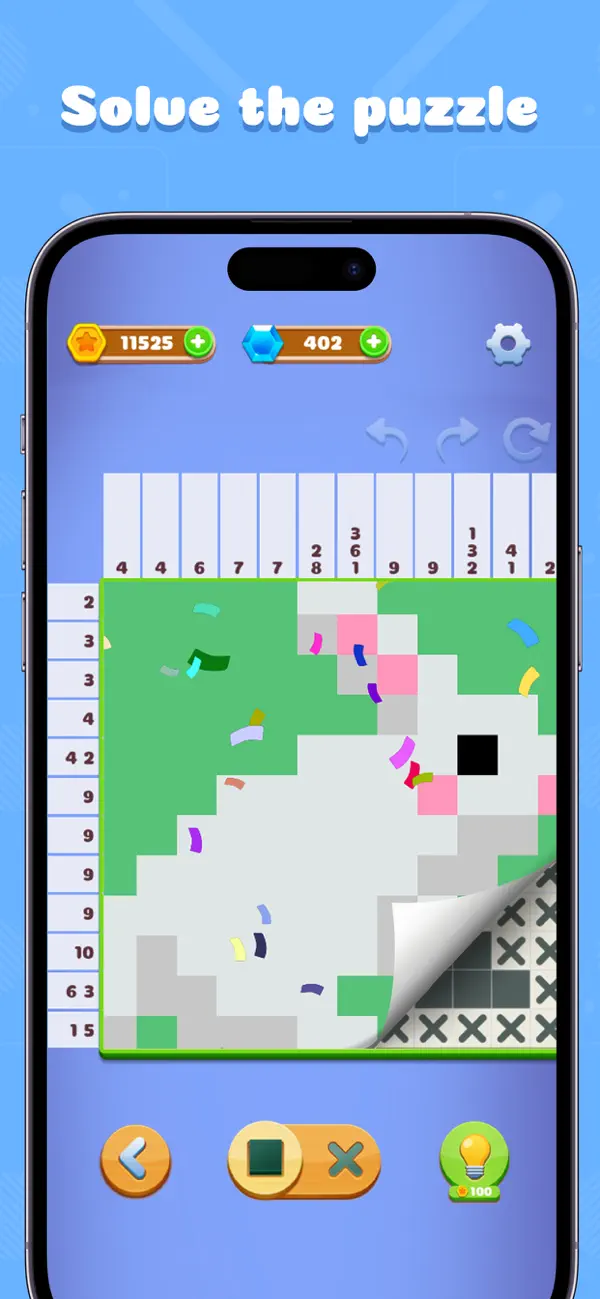
The numbers at the side and top of the grid tell you how many consecutive squares are filled in that row or column. If you see '3 1', it means there is a block of 3, followed by at least one empty space, then a single block of 1.
Gameplays
Once you have determined that a square must be empty, use the 'X' tool to mark it. This is crucial for higher difficulty puzzles as it helps you visually narrow down the remaining possibilities for the filled squares.
Screenshot


Q&A
You have a limited number of lives (usually 3). If you use them all, you can often watch an ad to continue or restart the level.
Ratings & Reviews
My Personal Favorate
Sun Jun 16 2024 Jordyn:>Hey there! I’ve been around this game for some time, and im about to reach level 500. I love this game! But I only have 2 problems. First, I’m gonna start with what I love about the game. Nonogram Color helps take my mind off of things stressful, or just something i dont wanna have in my mind, away! When I get home from a long day, i lay down in bed and just start playing. This game is so relaxing, but i can only play it for a few rounds until i start getting the slightest bit annoyed. in this case, leads us to the problems ive got. so for one, almost every time i run out of hearts on a few levels i get quizzical on, i would click restart, and it would lead to an add. yeah, i know that tons and tons and tons and TONS of people complain about this topic, i just think about that. but obviously, this is my opinion, nobody else needs to think the same thing as me. so maybe, im thinking we could limit the adds a slight bit, just so the people who decide to play this game can enjoy it without getting adds every time they hit restart. But my last problem is the slight lag. with the level im on, theres just a slight time gap in between the screen and your touch. its not big, but you can definitely notice it. im not a game developer, but if you are able to fix that bug itd be great! but this is an amazing game. im totally so attached to it that i feel like im shadowing it at this point. i highly recommend this game if you are going through something. believe it or not, it helped my mental health! so i recommend this game big time. sorry if i had any spelling errors, but i hope this review comes in handy. thanks for reading, fellows!
Favorite Puzzle game, but one big issue
Tue Aug 03 2021 Black popperThis app is by far my favorite so far for these puzzles and I have to admit- I’m hooked! However I’ve been running into a big issue/glitch pretty consistently for a while now. Ever since around the 1000th level (I’m now on the 2900th level), the game has been getting slower and laggier. It tends to be fine if you reboot the app, but after a few levels, the app gets very laggy and doesn’t register all your clicks immediately. And once this happens, it only starts getting slower and slower until you reboot. Now weirdly enough, the app lags your entire phone, not just the game. When you try and exit the game, or even fully close it by double clicking the home button and swiping up, your whole phone lags. Either way, it’s just an annoyance but it won’t stop me from trying to complete all the levels in the game! (I believe there’s 3500 right??) Thanks!
Distasteful and offensive
Sun Feb 05 2023 user123456443144422245I've been playing a better version of this game that gives the player countless tools to handle big challenges. Things like: different versions of an X for different types of guesses, rulers, a movable cursor to prevent accidental clicks, a counter that appears to show how big of a line you've drawn, a fair hint system, and different ways to draw like multiple lines at one and freestyle dragging. Not only does this game have none of that, the pictures themselves lack creativity and compensate by completely changing the colors the instant you're done with the puzzle. The satisfaction of looking at a puzzle you worked on after finishing it is completely destroyed in this way and I'm offended that was ever considered a good idea by anyone. I only installed this because I'm starting to run out of puzzles on that app, but this one doesn't let you set a difficulty or skill level. It makes you start in small 5x5 patterns as if you have no clue how to play the game. I assume I'll have to burn through at least a hundred beginner puzzles before I get to anything even moderately fun. But since the UI is so inconsiderate, I doubt I would enjoy any that exceed 15 by 15. That being said, my sweet spot is the 30x30 range, and don't think it would be worth it to grind my way there considering my other issues. Instead I'll be fine looking through the large selection of community made puzzles on the other app, even if they're less satisfying than the main ones I've nearly ran out of.
I loved it, but their user experience...
Thu Nov 26 2020 CjnbostonEdit: this developer consistently makes updates that are counter-intuitive to the user experience. If you play both the black and white game and the color game, you’ll know that if you leave a puzzle in the middle there is an option to either continue or restart. In the original black and white game, the continue button it on top, and the restart button is on the bottom, while in this game they’ve inexplicably reversed it, so if you play a lot and by muscle memory you’re going to be completely screwed in this game and constantly restarting things you didn’t intend to. It’s IMMENSELY frustrating and not at all necessary. Just another in a series of puzzling decisions that make me wonder who is designing their UX, or if they actually play their own games. This is a great update to the black and white game. The color totally fixes my main issue with their first game (which is that it’s hard to see whether you have the X or the block selected, and clicking on the toggle switches you automatically, even if you wanted the one you were already on). With this one, because it’s color, you select the color and the block type, so it’s much easier to tell, and the toggle function doesn’t automatically switch back and forth. Perfect update.
Great game, but needs big UX change
Sun Jan 03 2021 smartin0385I don’t know why I’m going to bother writing this, because the suggestion will go nowhere. I am addicted to the b&w version and decided to give this one a try. It fixes some of the issues from the other, but can be much better. The biggest problem with the game is visibility. It uses rectangles to identify the color, and small white numbers. It’s not terrible with darker colors, but near impossible to read on the yellow and pink. I probably wouldn’t have had the issue when I was younger, but now it’s hard to see the difference between the tiny white 2 and 3 on the yellow background. The font size is much better on the b&w version. Using the larger iPad didn’t help. Would you consider using that larger font, and applying the color to the number instead of having the background? The other issue is it’s hard to tell the difference between the pink rectangle and the washed out (completed) red. There have been many times I thought I completed squares but found out they were pink after attempting to X them out. Now that I’m older these are the type of games I like. I can’t help but believe you are losing a large segment of potential users (and ad revenue) by having these usability issues.
remove new fill animation please
Wed May 28 2025 PinkypopwintI love this game and play it almost daily. I’m currently on level 5376 and the game had an update a few days ago, making it unplayable for me. There is a new fill animation when filling in the squares that it very distracting and makes me not want to play the game at all anymore, which is very disappointing because it is part of my daily routine to wind down. There was also a change to the numbers at the side of each row; now, when you finish a color for a particular row, instead of being grayed out, the number changes to a lighter version of the same color the number was, which is confusing to me now. It makes it difficult to determine what colors I have left in each row. I strongly suggest either to remove these changes, or to create an option in the settings to turn them off. Not only are these new updates distracting, they’re also an accessibility issue. I already tried looking in the settings to turn them off and found nothing, which I was surprised by. Seeing what level I’m on, you can see I have sunk probably hundreds of hours into this game, so I hope you will take my opinion into account. Please introduce a setting to turn off the excess movement and revert back to how it was before this newest update. Thank you.
Great, but bad controls
Thu Apr 15 2021 Stellar_IThis game is pretty and bright. Second thing I like is the fun of gradually discovering each picture. Also the logic required is a fun challenge. Unfortunately, the buttons used for filling in colors or X (no color) I find non-intuitive. I have made dozens of errors. It because of bad logic, but because the button was set to an unexpected combination of color and function. You have to tap colors to “load” the two-state button and switch the button to the right state. Get part of that wrong before touching the picture, and it dings you! To make it worse, the game also switches color and button state without the player making that choice. You’ll find yourself thinking “That’s not what I asked for! Why did it do that?” Far better would have been one button for each color plus one button for X. Tap the color or X you want to place and tap the board where you want to place it.
Good but needs some improvement
Sat Feb 03 2024 Ku'ualohaPlease make the numbers bigger, it’s so difficult to see numbers when doing larger puzzles, I often can’t tell if it’s a 6 or an 8 or a 5. I’ve seen many other reviews complaining about the same issue & despite the developer having a similar app with just black squares that has a far superior font and font size, the developer response to others has been that they can’t change the font/size at the moment… why not?!… if you can do it on your previous version, you should be able to do it here as well. It’s VERY frustrating and if it doesn’t change soon, I’ll be deleting the app. Also please make a way to select squares and have to confirm it, the squares are small and I often accidentally select an adjacent square when trying to select squares and lose a heart. Or improve the apps ability to know which square we are trying to select, it seems off currently. Other than that, it’s very fun and addicting… in a good way.
Some Youtube Videos found!


News found!
 Miniclip purchases Easybrain from Embracer for $1.2bn
Miniclip has acquired Cyprus-based mobile games developer Easybrain from Embracer Group for $1.2 billion.
PocketGamer.biz Sat Jun 28 2025
 Embracer Group acquires mobile game maker Easybrain for $640 million
Embracer Group has also acquired mobile game maker Easybrain in Cyprus for at least $640 million, with as much as $125 million in bonuses.
VentureBeat Sat Aug 28 2021
 Nonogram.com - Number Games by Easybrain Ltd
Nonogram.com is an addictive logic game with a vast collection of picture cross puzzles. Due to their simple yet challenging gameplay, nonograms have become...
AppAdvice Sun Sep 21 2025
Nonogram.com Color: Logic Game by Easybrain LtdNonogram.com Color is easy to learn and quite addictive once you start playing. Challenge yourself and enjoy hours of fun with logic number puzzles!
AppAdvice Sat Jun 28 2025
 Nonogram - Jigsaw Number Game by Yunbu
Nonogram is a game to solve logic number puzzles by filling or left blank cells according to numbers as clues at the side of the grid to...
AppAdvice Mon Jul 28 2025