Killer Sudoku CTC
by Cracking the Cryptic
Ratings
Age
4+
Category
Puzzle
Languages
English
Tue Apr 05 2022
- 40 new puzzles
- 15 bonus beginner puzzles
All 100(+) puzzles are out now, thank you for playing Killer Sudoku!

Presented by Mark Goodliffe and Simon Anthony, the hosts of Cracking the Cryptic, this app brings you the very best Killer Sudoku puzzles. Unlike computer-generated apps, every puzzle here has been hand-selected and tested to ensure a logical and rewarding solving experience. Use advanced note-taking tools and hint systems designed to teach you how to become a better solver.
Dinsun Expert Review
Our Expert Score
Killer Sudoku by Cracking the Cryptic is arguably the gold standard for Sudoku apps. Based on the incredibly popular YouTube channel, this app features hand-crafted puzzles that are far superior to the randomly generated grids found in cheaper apps. Each level is a work of art, designed to lead you through a specific logical journey that feels more like solving a mystery than doing math.
The 'Killer' variant adds 'cages' that must sum up to a specific number, adding a layer of arithmetic to the classic Sudoku rules. The UI is clearly built by people who play Sudoku seriously; the note-taking tools are intuitive, and the 'color' highlighting allows for advanced strategies like 'Snyder notation' or 'coloring.' It’s a challenging, premium experience that respects the player's intelligence and offers hours of deep, satisfying mental exercise.
Features
100+ hand-crafted levels
No computer-generated 'filler' puzzles
Hint system that explains the logic
Beautiful, clean interface
Tips & Walkthrough
In Killer Sudoku, every 3x3 box, row, and column must sum to 45. Use this knowledge to find the value of tiles that 'stick out' of a cage that otherwise fits perfectly within a unit.
Gameplays
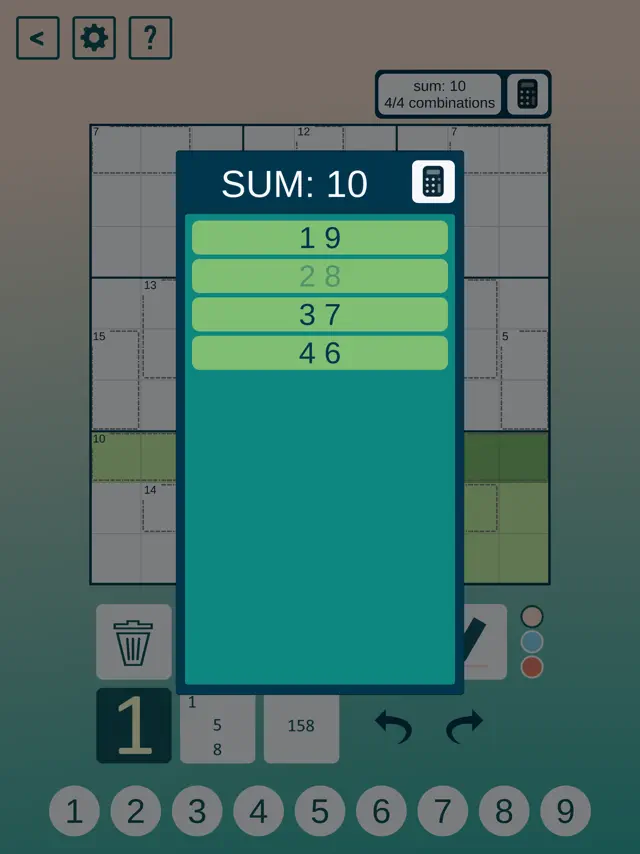
Use the 'Corner' notes for candidates and 'Center' notes for specific strategies. You can also use the color tool to highlight groups of cells that must share the same value.
Screenshot



Q&A
The puzzles range from 'Easy' to 'Diabolical,' so there is something for everyone, but it leans toward those who enjoy a real challenge.
Ratings & Reviews
Overwhelmingly Beautiful
Tue Dec 15 2020 MrGallant210I never take the time to write reviews for apps, because there is usually not enough motivation for me to. However, there are so many great things about this app that I felt this app deserves to be known for. The puzzles. These are not computer generated, run of the mill puzzles. There is always something very neat about puzzles set by a human, and the developer for this app knows that. The logic is always satisfying to discover. The challenge of the puzzles is also at a good level: for those who have never seen this sudoku variant before, it may be tough, but for those who have seen one or two solves, these puzzles (at least the first five or so) won’t kill you. A good way to get into them, I say. I know with this app that when I click on a puzzle, I will be getting an interesting logical stimulant that has a gorgeous solution. The design. This app is made by people that solve puzzles every day and love them. They know what feels good in a sudoku design and what doesn’t. The settings also allow you to choose how much of the note taking and number filling the computer does for you. No ads in sight (but that would be silly on a paid app). The cost. For the amount of work it takes to put together this level of a sudoku app, $5 is more than reasonable. It doesn’t hurt that these developers are on round 6 of sudoku apps and know exactly what their consumers expect for five dollars. In short, there is no better killer sudoku app out there. This one is fresh and stimulating. This is the perfect gift for a holiday season, for yourself or for others. I cannot recommend it enough. Thank you, CTC!
Another great entry with good app improvements
Mon Dec 14 2020 JdesurraI’ve been a big fan of the Cracking the Cryptic apps, and this one is the best iteration so far. The author line up is great with Christopher Seeliger leading off the puzzles. The killer cages are easily visible, and the themes are a good mix of colors. Like the Sandwich Sudoku app, there is a column to show possible combinations in cages for those of us who struggle with mental math. There are 40 puzzles to start, which I think will keep most solvers busy for a bit. The only downside was I was hoping there would be some little killer puzzles, but it doesn’t look like there are any. That’s a bit of a nitpick since that was never really promised, but it would have been fun to see since combo killer-little killers are quite fun. In case case, this is well worth the money. Another great addition to the CtC app collection.
Not your average killer sudoku
Tue Dec 22 2020 JterseskKiller sudoku is my favorite sudoku variant, and when I heard Cracking the Cryptic was releasing their own app, I was thrilled. As with their other apps, every single puzzle is hand-crafted and tested, and the creators themselves have written a series of hints for each puzzle that not only help you find the next step if you’re stuck but actually teach you techniques to improve your skills. Every puzzle in this app is absolutely extraordinary. They’ve been constructed by some of the world’s best setters. This is NOT your average killer sudoku. The logic involved is unique and exciting to find. Plus, the app has every feature I could ask for in a sudoku app: double notation, your choice of error-checking options, the ability to highlight and color, undo and redo. And specific to killer, it will add up cage totals for you, and it gives a list of all possible combinations for a given cage, and has a calculator for you to test other combinations. It’s a magnificent app, and well worth the $5. My only real complaint is the occasional typo in the hints, but it hardly mars the overall experience. Also, if there were a way to view the hint and the grid at the same time, that would be helpful.
Top Notch
Sun May 23 2021 Dave WooldridgeI really appreciate all of Cracking the Cryptics sudoku apps, and this is one of my favorites. I enjoy that the puzzles in the beginning teach you the particular logic that you’ll need for more challenging puzzles (like how the first puzzle teaches you to use The Secret). One aspect I really like is the app does a lot of accounting aspects for you, like giving you possible combinations for a given killer cage along with a calculator, plus automatically removing pencil marks that a placed digit interacts with. That is the developers respecting the intelligence of the solver; the challenge is deductions, not getting buried under your pencil marks or petty arithmetic. Top notch app, hats off to the setters who contributed and the development team.
Beautiful! And a request...
Tue Oct 18 2022 crag__All of CTC's Sudoku apps have beautiful puzzles and excellent tools. My only request for their Killer (and Sandwich) Sudoku is to include list exclusion (in the given lists of sums) in the undo stack. I will often run aground and need to undo myself back a bit, and I lose my thread of deduction when the lists I've grayed out don't revert. If this is a known challenge for UX (it might appear that nothing happened), I would suggest showing (and flashing?) the sums panel when undoing those exclusions. I give it 5 stars regardless, but knowing how thoughtful they are I thought I would offer this request for future updates!
Great puzzles, Sometimes hints are not understandable
Wed Nov 17 2021 Backgammon MasterI enjoy Cracking The Cryptic variations on Sudoku puzzles and spend more time than I’d like to admit playing them. Sometimes when playing the more difficult puzzles, I look to the hints to get insight as to how to solve them. Many times, the hints are vague and do not help to understand the step. I get that it may be text length limited but if it doesn’t help, why bother. Keep making these puzzles while trying to help with better hints for solutions.
Difficulty curve too steep
Tue Jan 05 2021 ConfusedSkyOne thing I’ve liked about the CTC apps is that they generally have a pretty gracious difficulty curve where you slowly get introduced to more concepts relating to the sudoku variant. Consequently, I’ve found it a bit harder to develop an intuition for this one. I felt almost completely lost after the first few. Of course I’m still learning, but I’ve had to view the hints quite a bit. I think for example after you get the 12 cage in puzzle 5 the logic is quite accessible most people would be able to figure it out. However getting that cage is a multi step process where you have to look quite a bit ahead to understand. I definitely don’t think that deserves to be a 3 star puzzle for that reason.
Tough but excellent puzzles
Sat Jun 05 2021 dsmarleyA great app for when I’m looking for a really tough puzzle to chew on for an hour. One of the few puzzle apps where I don’t feel too guilty about resorting to a hint now and then. Or if eight or nine minutes go by and I can’t find a logical deduction that’ll move me forward, the app makes it possible to make a guess as to a digit in a particular box and see where it leads. I color the box before I make my guess as to its contents, so that if I reach a contradiction, I can quick undo my moves until the color disappears and I’m back where I started. Very handy. Speaking of hints, though, the first hint in puzzle #22 is in error. One suggestion: When one taps on a box, all the other boxes that that box “sees” are shaded. I’d find it helpful if the other boxes within the same cage could shaded in a slightly different color.