Clash Caddie
Golf Clash Wind Calculator
Ratings
Age
4+
Category
Casual
Languages
English
Sun Oct 27 2024
New
- Notification Calculator (iPhone only)
- Customise background / foreground of keypad buttons

Clash Caddie is a specialized utility tool designed to help Golf Clash players achieve more precise shots. It provides comprehensive wind statistics for all clubs and levels, offering fast calculations for Min, Mid, and Max ring adjustments. Players can manage multiple accounts and bags, use a slider for mid-value tweaks, and access advanced features like CPC Club Detection and a Slider Ruler to elevate their competitive play.
Dinsun Expert Review
Our Expert Score
Clash Caddie is the essential companion for any serious Golf Clash player. As a tool designed to elevate your game, it removes the guesswork from wind adjustments, which is the single most important factor in high-level play. The UI is clean and intuitive, allowing for fast wind entry and automatic ring calculations for Min, Mid, and Max distances. It’s the difference between a 'close' shot and a 'hole-in-one.'
What makes it stand out is the account management—being able to save multiple bags for different accounts is a lifesaver for competitive players. The addition of features like CPC Club Detection and the Slider Ruler shows that the developers are in tune with what the community needs. While it requires an in-app purchase for the most advanced tools, the base functionality is enough to significantly improve your accuracy. It’s a specialized tool that does one thing incredibly well: making you a better golfer.
Features
Precise wind-to-ring calculations
Multiple account and bag management
Slider for custom mid-range tweaks
CPC Club Detection (via IAP)
Powerball support for accurate stats
Tips & Walkthrough
Before heading into a match, ensure your club levels are correctly entered in your account bags. This ensures the ring calculations are accurate to your specific gear, which is vital for making precise wind adjustments during a game.
Gameplays
During play, enter the wind value into the calculator. Clash Caddie will immediately display the number of rings you need to adjust for your current club at its minimum, middle, and maximum ranges, allowing for near-perfect shot placement.
Screenshot


Q&A
Yes, it supports Slide Over on iPads with A8 chips and above, allowing you to use the calculator without leaving your game.
Ratings & Reviews
New version works fine, but buggy…
Wed Sep 04 2024 GCBandPlz help! When I update my clubs, it does not save the new numbers, even after pressing “save”. Perhaps include some tutorials? I managed to figure it out, but looks like a lot of others are struggling to use it. Others ideas… line up the “clear wind” button with the select wind button and do the same with the “clear slider” button. Also, we need the “series” clubs from the road-to-fame soon.
Close
Mon Sep 09 2024 The ClericThe latest version fixes most of the glaring problems of the past, with one exception. Switching bags on the wind-calculator page is still too many steps, and therefore too slow. The current version forces me to click once to choose which account, and only then brings up a drop-down menu of bag choices. A much better approach would be to have two separate buttons—one to change accounts, and the other to select bags. Most people play multiple games in a row using the same game account. Even better, for users (like me) who only play with one game account, you should eliminate the account-setting step on the wind calculator page, leaving us with just the bag-choice menu. Speed matters with Clash Caddie, because GC is a timed game. I can’t be losing half a second on every stroke. One final complaint: the ball power button is essentially illegible. Please make the presence/absence of the GC ball power icons a user preference. Reading a simple number is much faster and more accurate than interpreting an icon, even when the icon includes a microscopic number at the bottom.
Tricky at first…
Fri Aug 30 2024 jhsjazzAdding a bag to the wind chart was not intuitive, but look at the preview screenshots and you’ll see you need to press and hold on the add account screen to add your bag to the wind chart section. Once you do that, the drop down will work. This new update allows you to add your entire bag to one, so no more switching back and forth (unless you want to or have multiple accounts). This is a great feature!! I look forward to more positive improvements in the future.
Tutorial Needed for the update
Fri Aug 30 2024 GolfClasher9mmI loved the old version of clash caddie! But this new update is a bit confusing and it would be very helpful if the creator could create a video walking people through utilization of all the features and how they work best. It took me a while just to figure out how to set up my bag then attempting to use I didn’t seem to be using it near as accurate as before the update. Thank you to the creators, but assistance in utilization would make this more amazing.
New Update
Wed Aug 28 2024 steve whaIt took a little time to figure out the new update and I think they did a great job. However I do have one issue and that is the selection of colors where the calculated wind ring adjustments are displayed. The colors are dark green for min slider, dark blue for mid slider, and dark red for max slider. With the numbers being displayed in black, the lack of contrast makes them very hard to see especially the blue. Suggest changing to lighter colors.
The new version is good!
Tue Sep 10 2024 RBGODWhile not without its bugs and things that could be better, I found that this version is much easier to use in game than the old version. With a touch of the notification you can easily open caddie, adjust, and then a simple swipe from the bottom horizontal bar to quickly get back to the game. The recently added instructions were a huge help! Thank you! BUGS After adding account and bags, I needed to restart app to get them to appear in the wind tab SUGGESTIONS Add the chosen club to the notification after adjusting the wind, etc Make it faster to change bags. Currently takes 2 taps to choose. Could be done in one. What is the point of multiple accounts? Maybe add an example to the instructions.
No Support
Thu Aug 29 2024 r1vansI’ve been using CC for a long time and have seen measurable improvement in my GC game. However, with the (maybe hasty?) release of the new version I cannot build back the bags I had set up. And, I cannot even build a bag without including every club in the list. No one to call, text or contact but they sure took my money for the coffee and features not in included with the app.
Great Update
Thu Aug 29 2024 R_WillyThe quick start guide did drop after the new update release but it was rather easy to figure out. I suggest ignoring complaints about not being able add bags, etc. Take a few moments to learn how to use it. Beautiful graphics with some new features you can purchase. Set your club levels for each account then configure your bags. No more adjusting club levels per bag.
Some Youtube Videos found!

CLASH CADDY 3.0.2 FULL WALK THROUGH - YouTube

PRO & EXPERT Playthrough, Hole 1-9 - Pixel Playground Tournament! *Golf Clash Guide
Clash Caddie for Android Review - YouTube

Golf Clash Grid Lines Clash Caddie GolfClash Notebook Tool Tutorial for IOS #GolfClash - YouTube
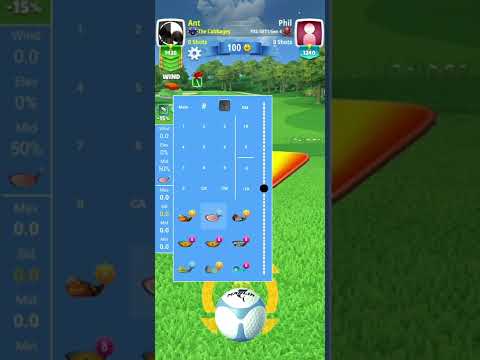
Clash Caddie Android Instructions - YouTube
How to use the Clash Caddie App on iPhone - YouTube