
Amaze GO!™
Help the arrows escape!
Ratings
Age
13+
Category
Games
Languages
English
Tue Oct 20 2026
Optimized user experience and performance!

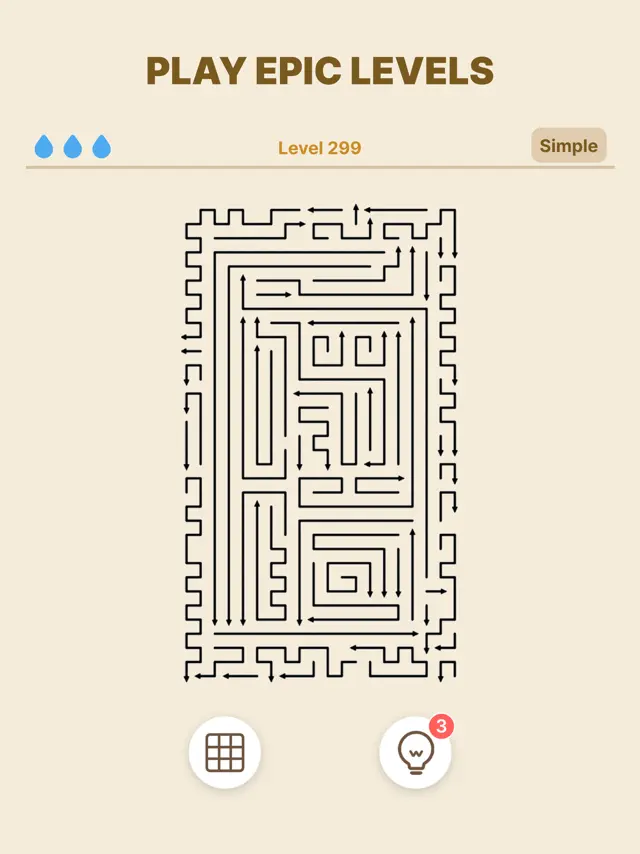
Arrows GO! is a clean and satisfying puzzle game designed to declutter your mind. Each level presents a grid of arrows pointing in different directions. Your goal is to guide each arrow off the screen without it colliding with another. With no timers and no pressure, the game focuses on the 'order of operations' and spatial logic. The minimalist design and soothing sound effects make it an ideal game for winding down after a busy day.
Dinsun Expert Review
Our Expert Score
Arrows GO! is the ultimate 'Zen' game. In an App Store full of loud, flashy icons and constant notifications, this app is a breath of fresh air. The interface is incredibly sparse—just the arrows and a plain background—which allows you to focus entirely on the logic of the puzzle. It’s surprisingly satisfying to watch the arrows zip off the screen one by one.
The difficulty curve is masterfully handled. It starts off almost too easy, but by level 50, you really have to plan four or five steps ahead to avoid a collision. It feels very similar to a digital version of those classic wooden sliding puzzles, but much more refined. If you’re a fan of 'anti-stress' games or minimalist logic puzzles like 'Lyne' or 'Knotwords,' you need to give this a try. It’s pure, unadulterated puzzle goodness.
Features
Over 1,000 unique levels with increasing complexity
Minimalist aesthetic with dark mode support
Completely playable offline
Upcoming Events

Tips & Walkthrough
Look for the arrows that have an unobstructed path to the edge of the screen. Clearing these 'outer' arrows first often reveals the path for the inner ones.
Gameplays
If you hit a dead end, use the 'Undo' button to step back one move, or reset the entire level to try a completely different sequence.
Screenshot




Q&A
The first 20 levels are ad-free; later levels contain occasional ads with a one-time 'No Ads' purchase option available.
Ratings & Reviews
Great Puzzle App!
Thu Sep 17 2026 Kara's mom 13I love the app. I’m not sure why there are people saying the levels are too easy & there’s no change when it literally states the level of the difficulty before every puzzle. The one thing I wish they’d install is a tutorial page where we can learn how to get more eagle eyes & more points. I’m not sure why sometimes I beat the level with full lives & no mistakes, at least 3 eagle eyes & only get a few thousand points but other times I get over 30,000 points. Instructions for improving scores would be cool. Then again I’d never be able to get a #1 spot for 8 days bc everyone would be better than me at it lol. I never got the Labor Day puzzles but did get chess shapes on my update. That was super fun!! Don’t change the game too much bc then it won’t be the same game at all. I love how I can get my grandson to play the carterpillar levels so you made it family friendly too! You should advertise that. Lastly the ads for betting on football sometimes stretch to way over 30 seconds which is way too long. Maybe only keep the 15 second ads? Make sure they’re age appropriate toi since as I mentioned children can share in the game experience. Thank you for a fabulous game! Keep up the awesomeness 💕My family & I love your games! Thank you for better sleep too.
Fun, and best of all, SIMPLE
Mon Jun 01 2026 darthgorbag(For context, I’m up to level 85 so far & I’ve earned one monthly bonus trophy.) This game has only one mechanic which is beyond easy to understand, but is still fun enough that it keeps me wanting to play a few extra levels longer every time. So much fun that I don’t even mind the unavoidable ads. Of course there are countless games on the App Store for which the same could be said, including MANY with the exact same arrow-maze-puzzle design as this one. But a lot of puzzle games feel overly “gamified” with things like limited energy, currencies, power-up, timers, quests, competitive multiplayer, endless barrages of overlapping limited-time/seasonal events… things to add challenge but also make a player feel like they HAVE TO play constantly in order to succeed (does no one remember when “addiction” was recognized as a BAD thing?!?) I’ve been trying to find a new game that ISN’T highly-gamified, so I can play it on a casual basis, and Arrows GO! is just what I needed.
Too many ads.
Sun Oct 04 2026 WoaikonglongI know that ads are required for “keeping the lights on “and general upkeep of a game. That said there are entirely too many for this game. I’m writing this because I came to delete the ad after leaving this review after less than 12 hours and then included an overnight. The game literally gave me an ad for a similar game without ads, there’s more than one way to generate revenue and there’s more than one way to place ads within a game that are acceptable to me. Having an ad after opening the app and then after every level which take about a minute, is just too many ads. Further be prepared for statistics that are entirely inaccurate because if 30% of players can’t finish a level they’re not going to move on how do you have 60% of players I can’t finish a level later on after that the statistics are misleading and annoying. I don’t care how many people actually can play the game. Finally, there are these flyover, let’s call them affirmations and statistics, in bubbles that will appear and cross over the gameplay field preventing you from actually being able to play until they pass. My three stars are coming from the fact that I didn’t see any glitches in the zoom function worked.
Good game, however:
Mon Jun 01 2026 sugar_ventriclesI like this game a lot, it’s great for passing the time. My issues are with the ads and popups. A game needs to run ads to be a free product, I get that, but when I (inevitably) fail a level and it offers to either allow me to continue the level by watching an ad or retry the level, I feel like picking retry shouldn’t force me to watch an ad. My options are to either watch an ad or watch an ad AND restart the level. My other gripe is with the little statistics popups. “99% of users fail this level!1!1!” loses all meaning when it’s placed before every single level. It makes me feel like an old person, even if the statistics are real. Also, it bothers me when it says “Eagle eye!” for the simple plays. Not that it should be removed, it’s a pretty standard feature for mobile games to have. A possible solution would be to either refine how the random praise works, or to add a setting to turn it off. Could also add a setting for the statistics? Speaking of settings, I was a little disappointed that it was just three toggles to control the separate volumes and haptics. I want to listen to my own music while playing, but the sound effects would be too loud, so I have to turn them off entirely. Perhaps a slider would be better.
TOO MANY ADS!
Thu Aug 13 2026 Lib Happy!at first, it’s one ad every time you’ve made three mistakes which is not really a mistake. It’s just that they pretend like you clicked a different arrow than the one you clicked because they’re very close together and after it happens three times you get a really long ad then it does it after two and then it’s every single time that you miss click you get an ad and the ads get longer and longer their ads that take minutes, not seconds and they are broken and just replay over and over again, the same ad right now I’m playing the game and the same ad. There’s some word game has just sat there and done it. It’s Little looks like a word Scrabble and First it wants to do letters that start with a P then letters that start with an L and then letters that start with an A doesn’t let me play. It just plays itself over and over again, and I only have about five pieces left on the board so I either quit the game and do a restart or I just waited out and hope that at some point something happens that that adds stops because there’s no way to do anything to make it stop. I feel like I’m in prison and being tortured in a hell and meanwhile while I’m trying to relax, I feel my cortisol level just spiking through the roof which means pretty soon I’m gonna be wide awake and angry thanks the stupid game that I’m playing to relax.
Addictive
Thu Apr 30 2026 uber-gooThis game is a great way to make time vanish. It is fun and challenging. The thing that really annoys me, however, is the automatic zoom in. Every level zooms in and must be zoomed back out to be played. Even on my iPad, each level zooms in. It would be much nicer if every level were zoomed to get the entire puzzle on the screen and allow the user to zoom from there. It can be argued that all the devices have different sized screens but the size can be queried so the proper size can be used. Yes, it is nice to be able to zoom in to help tap the correct arrows. But let me do it after I see what the puzzle looks like. I realize it does show the whole puzzle before zooming in… just leave it that way until I change it. Or at least have a setting to allow selection of auto zoom. On the lighter side can you help me keep from touching the screen in random places or accidentally touching the wrong arrow? I keep losing a “life” doing that. Oops! Or maybe you could figure out a way to stop time when I’m playing this so I can play longer without losing so much time.
Too Many Ads!
Tue Oct 06 2026 Fertilemyrtle3Like many other players, I absolutely love this game, and could even put up with a few ads, but lately they’ve become too long and intrusive. The stupid casino game ads repeat again with no way to stop them and despite me having the sound on the game (as well as my phone!) turned off, some of them start playing dialogue the minute they start. This is annoying and distracting, especially when I’m in a quiet environment trying not to disturb others. In addition, the ads are sometimes super long, and I’m losing my patience with the game because of this. I’d much rather pay for the game than have to sit through these ridiculous ads. The scrolling banners with other players’ stats are also annoying…. who cares how player ABC123 did on such-and-such level??? I’m not playing to compete with others or even myself, I’m just playing to relax and get a little bit of a challenge. It’s a great game, but something’s gotta give with these ads or I’m going to have to delete it.
Honest Review
Sat Aug 29 2026 JTdesignAfter playing this game for a while, the GAMEPLAY itself really is a GREAT experience. The APP, however has problems. Others have already pointed out issues with not having an ad-free option, the disruptive fly-by banners, and the weird, random statistics that show up. I agree with all that. I have not yet seen anyone point out (maybe I’ve just missed it) the “fat finger” issue. Often, I will intend to hit a particular arrow, but the app misinterprets my intended target, and I lose one of my “lives”. This can be a frustrating experience when it happens more than once during a single game. I don’t know how the developers can address this issue, and while I hope that they will find a way to do so (as it is more annoying than the other issues combined, IMO), the only workaround is to zoom in super close before you touch an arrow. The problem with that is then you lose the larger view of the game, making it more likely for you to make a mistake by not seeing an obstacle that is off-screen.
Walkthrough
Mastering Amaze GO!: Strategy Guide & Tips for Clearing Every Board
Mastering Amaze GO!: Strategy Guide & Tips for Clearing Every Board Master the arrow puzzle, keep your hearts full, and clear complex boards with ease. Amaze GO! (by Oakever Games) has quickly become one of the most addicting and cal...
Some Walkthrough
Some Youtube Videos found!

AMAZE Go! Gameplay & Walkthrough - All Levels

AMAZE Go! - Official Launch Trailer

AMAZE Go! Game - First Look & Gameplay Review

AMAZE Go! Walkthrough Part 1: Levels 1-50

AMAZE Go! Walkthrough Part 2: Hard Levels Guide

AMAZE Go! Tips and Strategies for Fast Maze Clearing

AMAZE Go! iOS Gameplay Recording

AMAZE Go! Level 100+ Advanced Puzzles Gameplay

AMAZE Go! Relaxing Color Maze Compilation


